Capture the conversation
Record your microphone and supported meeting audio. Turn microphone capture on during an app-audio recording without starting over.
A meeting companion for Mac
Sawti records your meetings, transcribes them on your Mac, and brings the context you choose into useful notes and answers.

FROM CONVERSATION TO CLARITY
Sawti keeps the meeting, the words, and the background knowledge connected—so you can stay present and find the important parts later.
Record your microphone and supported meeting audio. Turn microphone capture on during an app-audio recording without starting over.
Sawti transcribes audio on your Mac. Review the conversation, speakers, and AI notes together in your Library.
Review a concise recap and action items alongside the full transcript in your Library.
Sawti AssistantSCREEN + MEETINGRevenue rises through Q4. In the meeting, the team tied that growth to the new launch.
AI THAT STAYS WITH THE MEETING
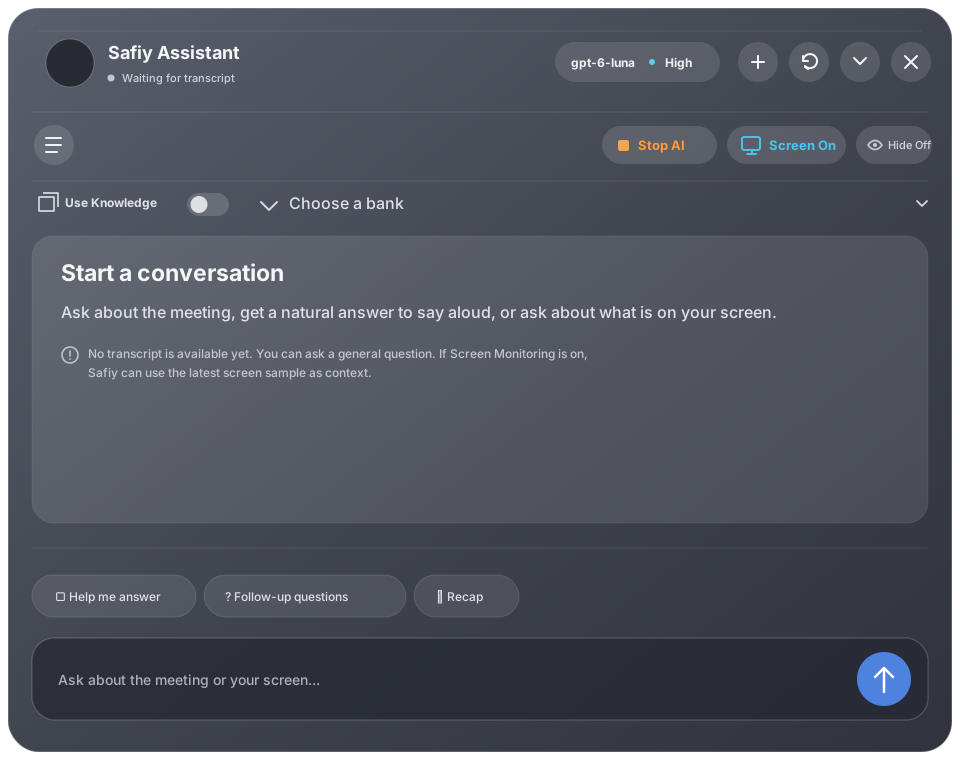
Sawti’s AI Assistant stays alongside your meeting. Ask for a natural reply, a concise recap, or a useful follow-up question without leaving the conversation.
Ask about what’s on your screen, the conversation, or how they connect. Sawti can use the latest screen context alongside the transcript and a Knowledge Bank you choose.
Screen Monitoring is optional and off by default. Turn it on to ask about what’s on screen; Sawti sends screen context to your configured AI connection only when you ask. A vision-capable model is required.
Sawti AssistantYOUR SOURCES. YOUR MEETINGS.
Create a separate Knowledge Bank for each class, client, project, or role. During a meeting, select the one that fits—or turn knowledge use off.
A few useful passages are added to the AI’s meeting context.
LOCAL BY DEFAULT. CLEAR BY DESIGN.
Recording files and transcripts are stored locally. Speech recognition runs on-device. Sawti doesn’t upload meeting audio to a Sawti server.
AI notes and chat use the provider you configure. When an AI feature runs, Sawti sends the provider the context it needs—such as transcript text, selected Knowledge Bank passages, or a screen image for a screen-aware question. Choose a local model connection to keep that processing on your own machine or network.
When Hide Sawti from screen sharing is on, Sawti windows and the live-caption bar are excluded from screen shares and screen captures. You can toggle it from the menu bar.
Read the privacy details
SAWTI FOR MAC · PUBLIC BETA
Free to try. No Sawti account required. Bring your own AI connection for AI notes and chat.
Download Sawti for MacVersion 0.8.2 beta 17 · Apple silicon · macOS 14.2 or later
The current beta file is hosted on GitHub; no account is needed. It is not notarized yet, so macOS may ask you to approve Sawti in System Settings → Privacy & Security. Release notes and all downloads
GOOD TO KNOW
Recording and local transcription don’t require an AI subscription. AI notes and the live assistant need an AI connection you configure. You can point Sawti to a local model or use a supported cloud provider.
PDF, DOCX, TXT, and Markdown files, plus notes you write or save from a meeting. You choose the bank for each recording and can switch knowledge use off.
Sawti’s current beta is for Apple silicon Macs (M1 or later) running macOS 14.2 or later. Speech models download on first use and can take up disk space.
Sawti is in beta. Recording paths and audio routes are still being qualified, so check the current release notes for known limitations before relying on a particular meeting setup.